I spend a lot of time looking at other people's websites. Usually it's because someone has asked me why theirs isn't bringing in work. After a while I started to notice the same problems coming up again and again, so I decided to check properly. I picked 50 small Leicester businesses, went through each of their websites, and wrote down what I found.
I'm not naming anyone. Nobody asked to be part of this, and I'd rather show the common gaps than single out a local plumber. Most of them take ten minutes to fix.
How I did it
I searched Google the way a customer would, things like "roofer Leicester" and "dentist Leicester", and took businesses from the results that had their own website. I skipped national chains, directories and lead-generation sites that pass enquiries on to someone else. I also skipped anyone who turned out to be based outside Leicestershire.
To stop one trade skewing the numbers, I capped it at four businesses per sector. The final 50 covered 15 trades: plumbers, electricians, roofers, hairdressers and salons, accountants, dentists, garages, florists, physios, landscapers, solicitors, cleaners, cafes and restaurants, kitchen and bathroom fitters, and driving schools.
For each one I looked at the homepage, and the contact page if the homepage was missing something. I was checking the things a customer looks for in the first few seconds:
- Is there a phone number, and can you tap it to call from a mobile?
- Is there an email address?
- Is there an address or postcode?
- Is there a clear next step, like "Get a quote" or "Book now"?
- Does the main heading say what the business does and where?
- Are there any reviews on the page?
- Does the site look like someone still looks after it?
I only looked at public pages. I didn't fill in any forms or contact anyone.
The numbers
Out of the 50 sites:
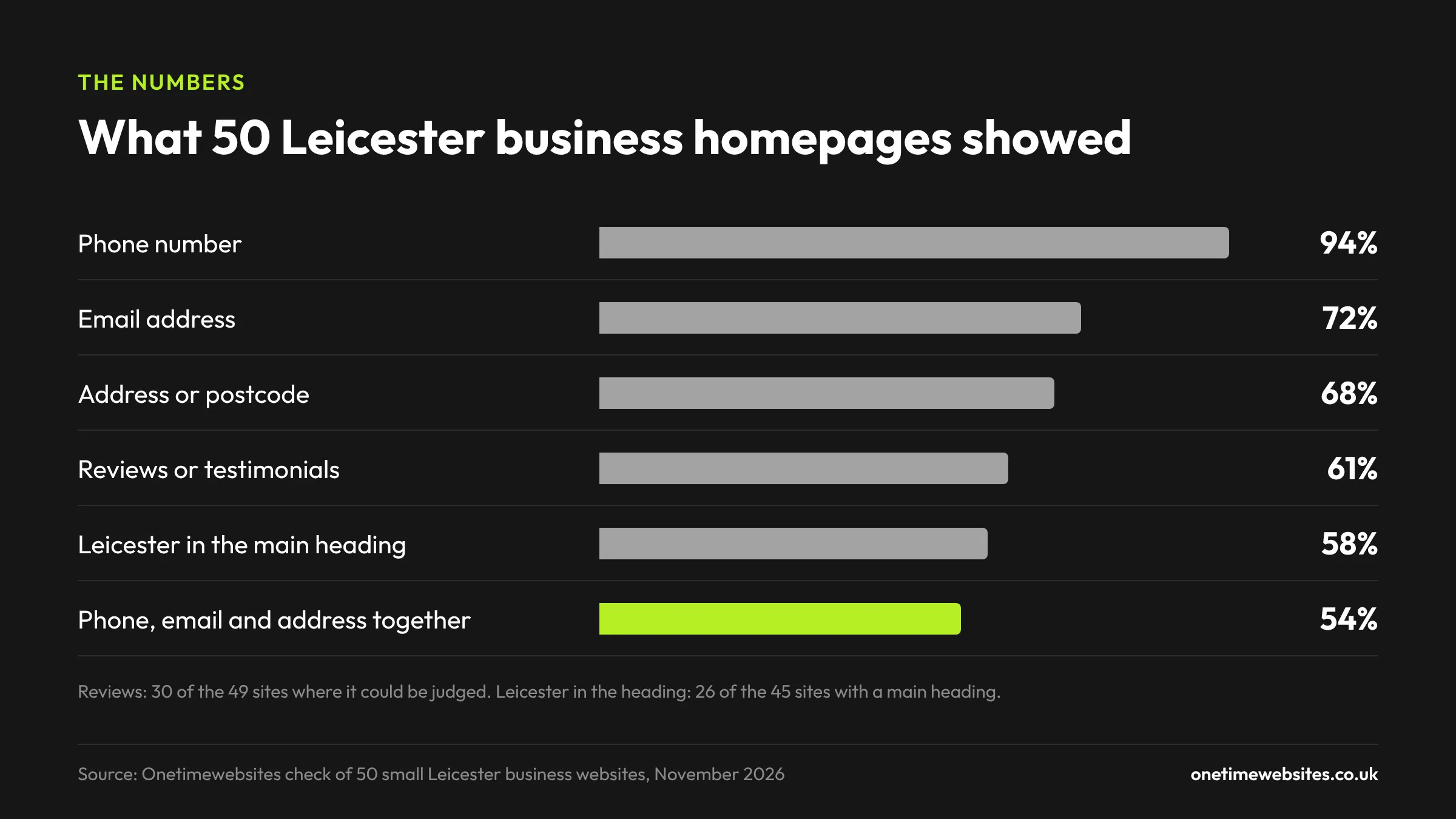
- 94% put a phone number on the homepage. That's the good news.
- 17% of those numbers were plain text you can't tap. On a phone you have to remember it or copy it out.
- 72% had an email address on the homepage. For 14% I couldn't find an email address on the homepage or the contact page.
- 68% showed an address or postcode on the homepage.
- Only 54% had all three (phone, email and address) on the homepage.
- 12% had no call to action near the top of the page at all.
- 61% showed reviews or testimonials on the homepage, so 39% didn't.
- Only 58% mentioned Leicester in their main heading.
- 10% had no main heading that I could find.
- 12% had a footer copyright year of 2024 or earlier. The oldest was 2011.
None of these are disasters on their own. But a customer comparing three roofers on their phone will usually ring the one that's easiest to ring.
Contact details are harder to find than you'd think
Nearly every site had a phone number somewhere, so I expected this part to be boring. It wasn't.
About one in six numbers couldn't be tapped. Most people looking for a tradesperson are doing it on their phone, often while they're dealing with the problem. If the number is just text, they have to hold it in their head, switch to the phone app and type it in. Some will. Plenty will go back to Google and tap the next one.
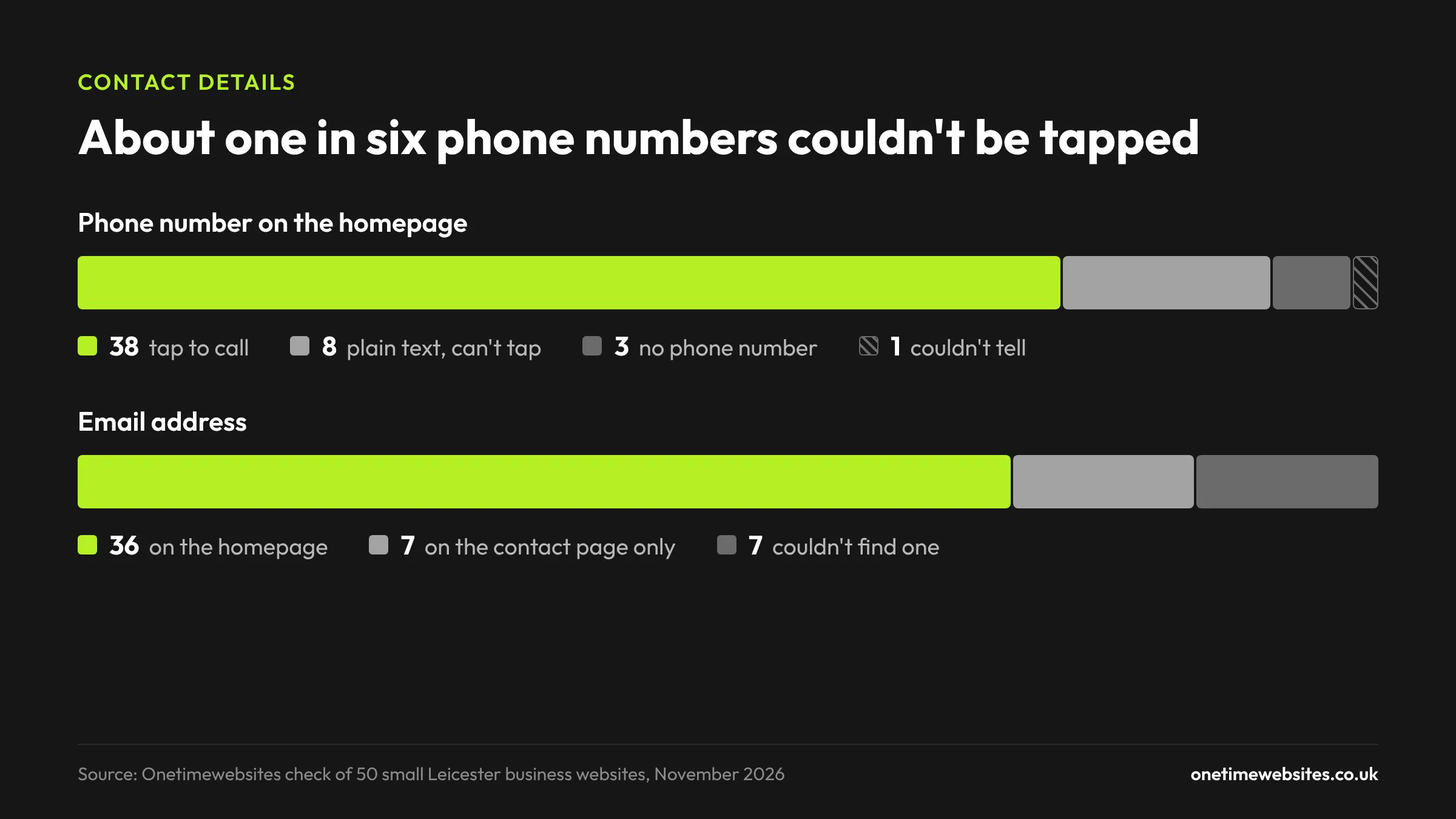
Then there were the sites showing different numbers in different places. At least four did this. On one plumber's site, the "Call now" button, the contact page and the footer each had a different number. A cleaning company had a number in the header and a number in the footer that were one digit apart, so one of them goes nowhere. If you've changed numbers at some point, it's worth searching your own site for the old one.
Email was patchier. For seven businesses I couldn't find an email address on either the homepage or the contact page. Most of those had a form instead, which is fine. One roofer had neither, so the only way to get in touch was to ring.
The cafes and small shops were the weakest here. All three sites with no phone number on the homepage were a florist or a cafe. Two of them were online shops, where the focus is on selling the product and the shop's own details had been left off the front page.
One in eight sites doesn't tell you what to do next
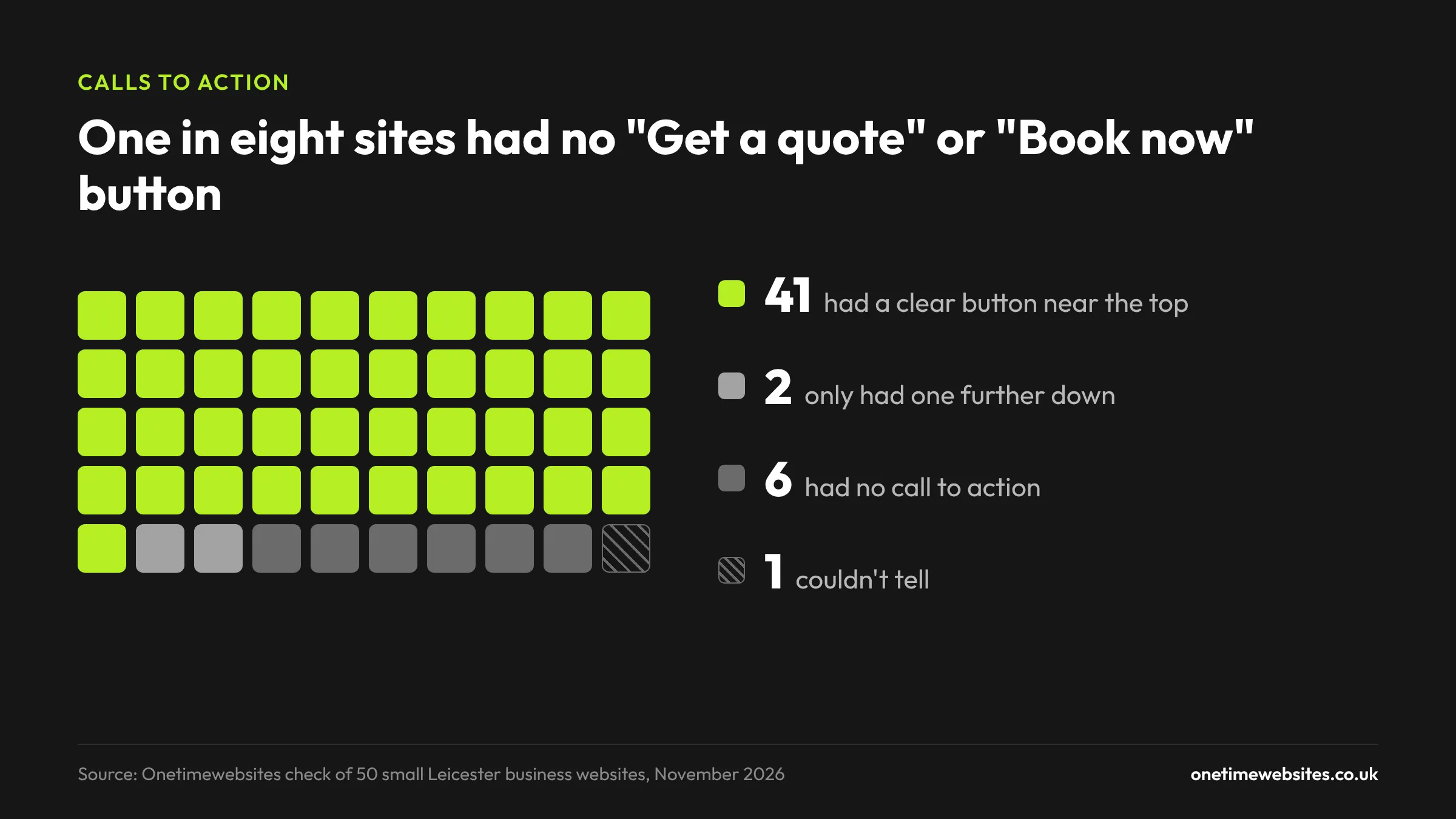
Most sites had a button near the top, and the best ones were specific, along the lines of "Book a free quote" or "Book an appointment". You know exactly what happens when you press it.
Six sites had nothing like that near the top. Others had a button that didn't lead anywhere useful. A law firm's main button said "Read More". A garage's said "Find Out More". Neither tells you how to book.
If you only change one thing after reading this, make it this. Put one button at the top of your homepage that says what the customer gets, and make it go straight to a phone call, a booking page or a short form.
Many sites don't say where they are
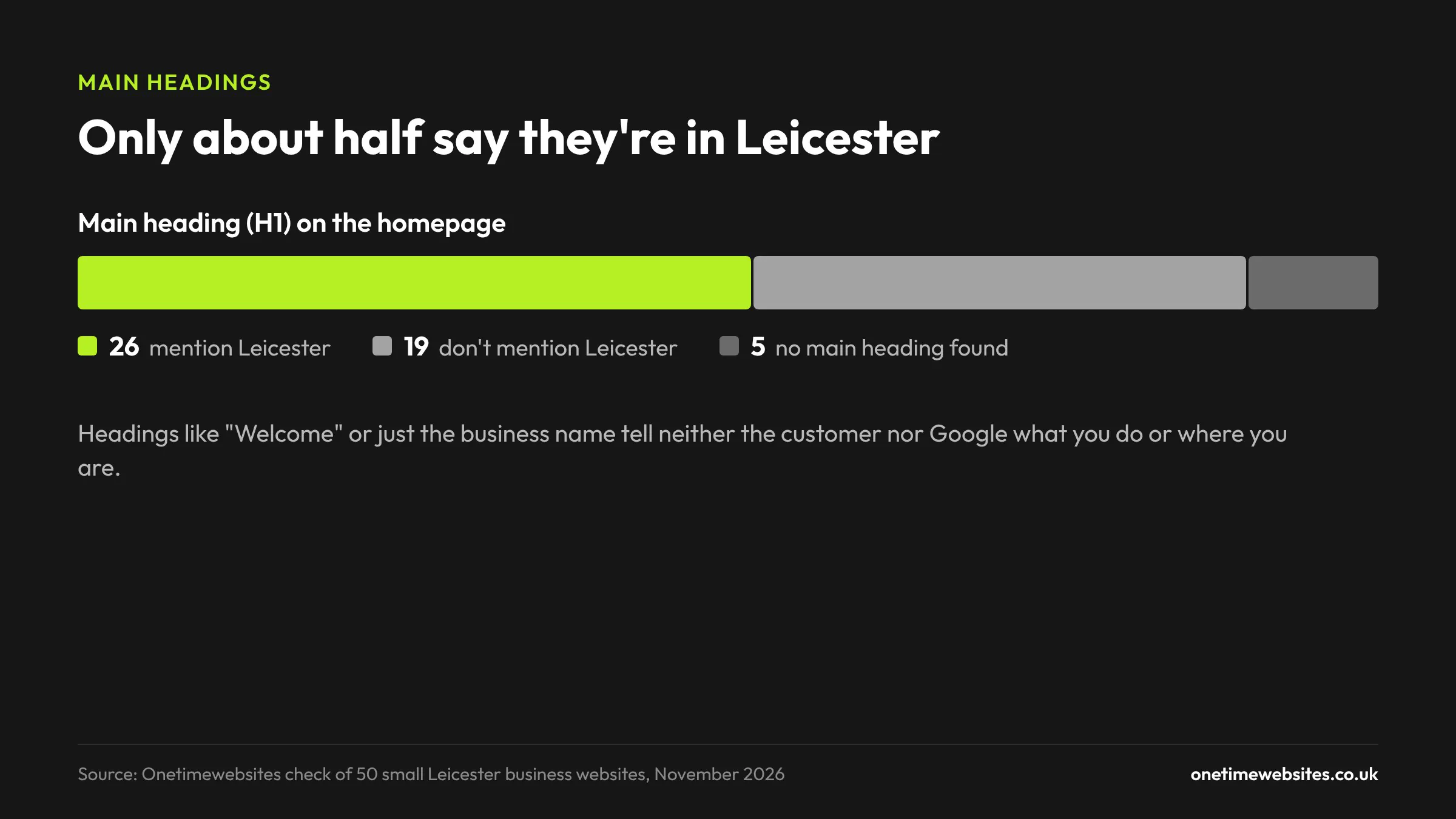
The main heading on a page (the H1) is one of the first things Google reads to work out what a page is about. It's also the first thing a visitor reads.
Only 58% of the sites mentioned Leicester in it. The rest had headings like "Welcome", "Welcome to [business name]", or just the business name in capitals. Five had no main heading that I could find.
A heading like "Plumber in Leicester" or "Private dentist in Leicester" tells both the customer and Google what you do and where you do it. "Welcome" tells them nothing. It's one of the easiest wins in local SEO, and it costs nothing.
Reviews are missing from a lot of homepages
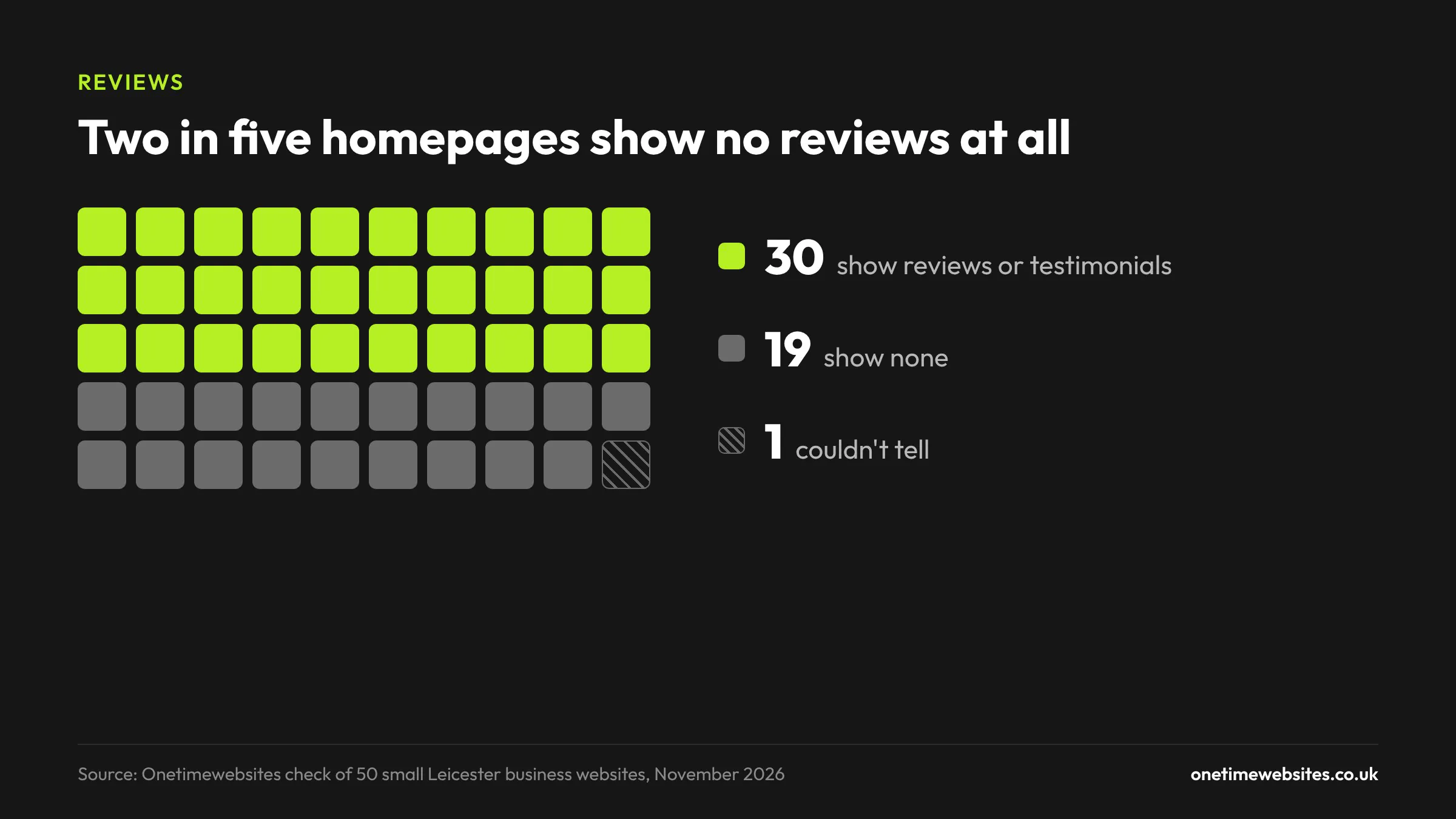
Only 61% put any reviews or testimonials on their homepage. For a local business, reviews are often what decides who gets the call.
A couple of the ones that did weren't doing themselves any favours. One accountant's testimonials section was still the placeholder Latin text from the website template. One roofer had a "Great reviews" heading with no reviews under it. A solicitor's testimonials were dated 2019.
If you've got good reviews on Google, put three or four short ones on your homepage, with first names and dates if you can. It's the closest thing to a recommendation from a friend.
Some sites look like nobody has checked them in years
This was the part that surprised me most. A good number of these sites had small signs that nobody had looked at them properly in a while:
- Two had Latin placeholder text from the template still live on the homepage.
- A driving school said "Lessons starting from £....." with the price never filled in.
- A garage had a "Content coming soon" block on its homepage.
- A cafe's newsletter box was showing an error message from the website builder.
- A garage listed its closing time as 6:00am.
- Social media icons that went nowhere, and one salon whose icons linked to a different business's accounts.
- A dental practice whose footer email address belonged to another practice.
- A link to Google+, which Google closed down in 2019.
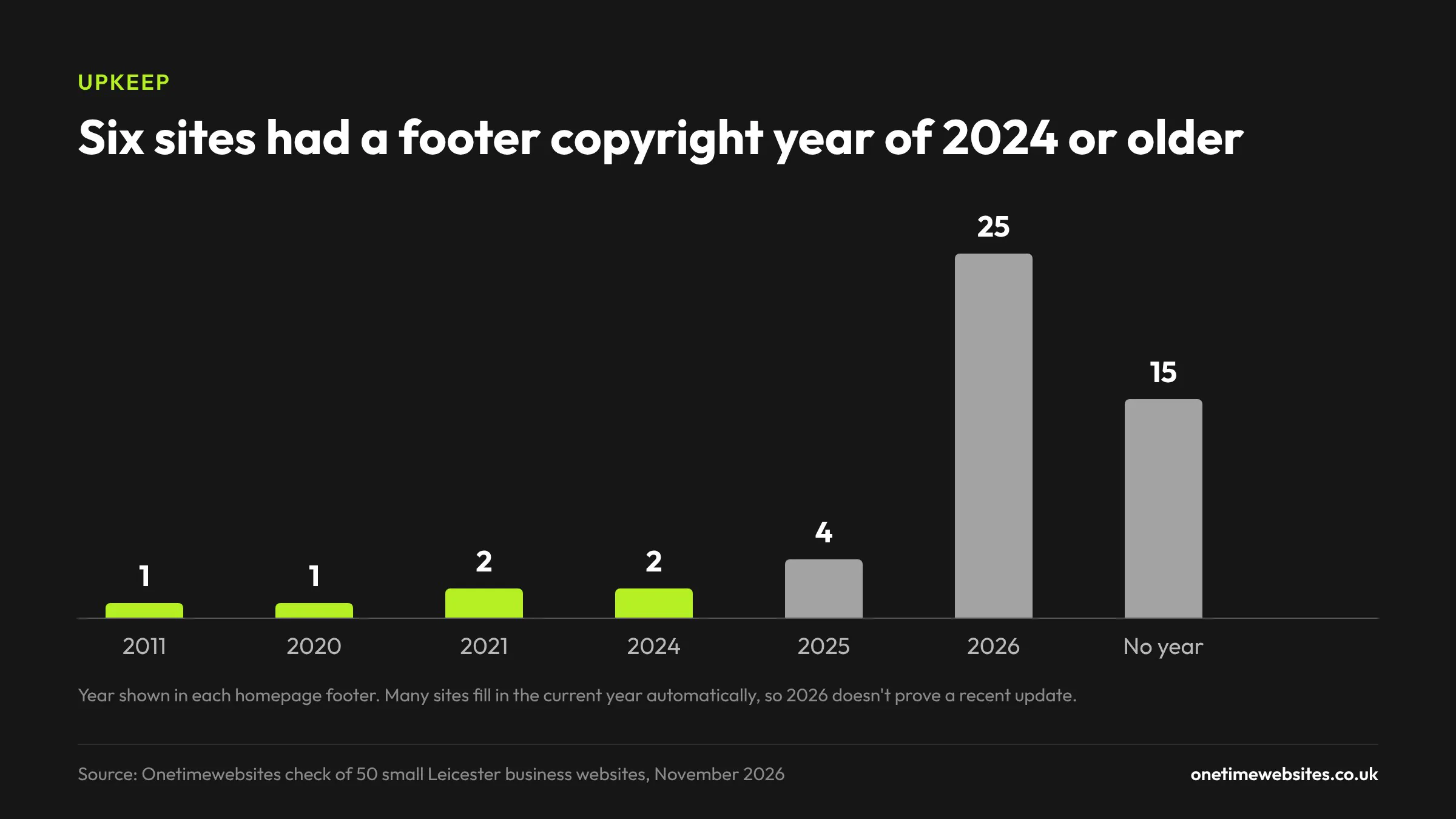
The footer copyright year backed this up. Six sites showed 2024 or earlier, including 2011, 2020 and two from 2021. That's not proof nobody has touched the site, but customers notice it, and it doesn't help.
The worst one was a cleaning company with hidden links to casino and slot sites buried in its homepage. You can't see them as a visitor, but Google can. That usually means the site has been hacked, and the owner probably has no idea.
What to check on your own website
You can do all of this in about ten minutes with your phone:
- Open your homepage on your phone and tap your phone number. Does it start a call?
- Check every phone number on the site is the same, and that it's the one you actually answer.
- Make sure your email address and your town or postcode are on the homepage, not only on the contact page.
- Look at the first thing you see without scrolling. Is there a button that tells a customer what to do next?
- Read your main heading. Does it say what you do and that you're in Leicester?
- Put a few real reviews on the homepage.
- Scroll to the bottom. Check the copyright year, the opening hours and the social links, and click each one.
- Search the page for any leftover template text, "coming soon" sections or prices that were never filled in.
It's also worth running your site through our free website speed checker while you're at it.
Frequently asked questions
Which businesses were in the study?
50 small and independent businesses with their own website and a Leicester or Leicestershire address, across 15 trades. I'm not naming them. I left out chains, directories, lead-generation sites and businesses based outside the county.
When was this done?
November 2026. Websites change, so some of these problems may have been fixed since.
Does the footer copyright year matter for SEO?
Not directly. Google doesn't rank you lower because your footer says 2021. But customers do notice it, and an old year is often a sign that other parts of the site haven't been checked either.
Why does a clickable phone number matter so much?
Most local searches happen on a phone. If the number is a proper link, one tap starts the call. If it's plain text, the customer has to copy it or type it in, and some won't bother. It's a small fix that any web designer can do in a few minutes.
Is it better to have a contact form or an email address?
Both, if you can. Some people like a form, some prefer to email from their own inbox so they have a copy. A phone number, an email address and a form between them cover nearly everyone.
Want a hand with it?
If you went through the checklist and found a few of these on your own site, most of them are quick to fix. If the site needs more than a few tweaks, that's what we do. We build small business websites for a one-off price, with no monthly fees, and everything in the checklist above is part of the build.
You can get in touch here.