Here's one of the questions we get all the time:
"How do you actually build a website?"
So, we thought we'd put together a simple guide to walk you through it, only in 7 steps.
Building a website involves two core phases: creative planning, which includes designing your brand and layout, and technical execution, which includes building and publishing.
First you have to define your goal and audience: determine if you need a portfolio, e-commerce store, or a business landing page.
1. Define the purpose.
- What is the website for?
- Who is the target audience?
- What action should visitors take?
-Research and get inspired.
-Look at competitors.
-Save examples of websites you like.
-Note what works and what doesn’t.
2. Find a good domain.
The domain you choose is the name of your website.
You can always switch your domain, but it’s best to start with one you’re planning to keep for a while.
Our advice for a good domain name is always:
“businessname.co.uk“
So, for example, if your business name is Joshua’s painting, we would want the domain to be:
"Joshuaspainting.co.uk"
It is also optional but recommended by us, to use a location on your domain, as it helps for SEO. It instantly builds local trust, improves local search rankings, and connects you directly with your target audience.
If or when your first choice is not available, it can be difficult to find a good substitute. We typically stick with .co.uk domains, as they are well-suited for UK-based businesses. If the exact .co.uk domain isn’t available, then .com is our next choice. Other extensions, such as .net, .org, .co, etc., but generally, we avoid using other extensions, unless there’s a strong branding reason, since the domain extension itself doesn’t directly affect SEO.
After selecting the domain name for your website, we will start creating the visual identity.
3. Plan the website structure.
Sketch the layout before thinking about design.
Why?
Without a clear structure, you can waste time redesigning pages, moving content around, and confusing visitors.
Planning the layout first helps you:
- Organise information logically.
- Create a better user experience.
- Ensure important pages and calls to action are easy to find.
- Save time during the design and development process.
Think of it like building a house: you create the floor plan before choosing the paint colours and furniture. The structure determines how people will move through and interact with your website.
The typical sections on a website:
- Hero section
- About
- Services
- Portfolio or gallery
- Testimonials
- Blogs
- FAQ
- Contact
- Footer
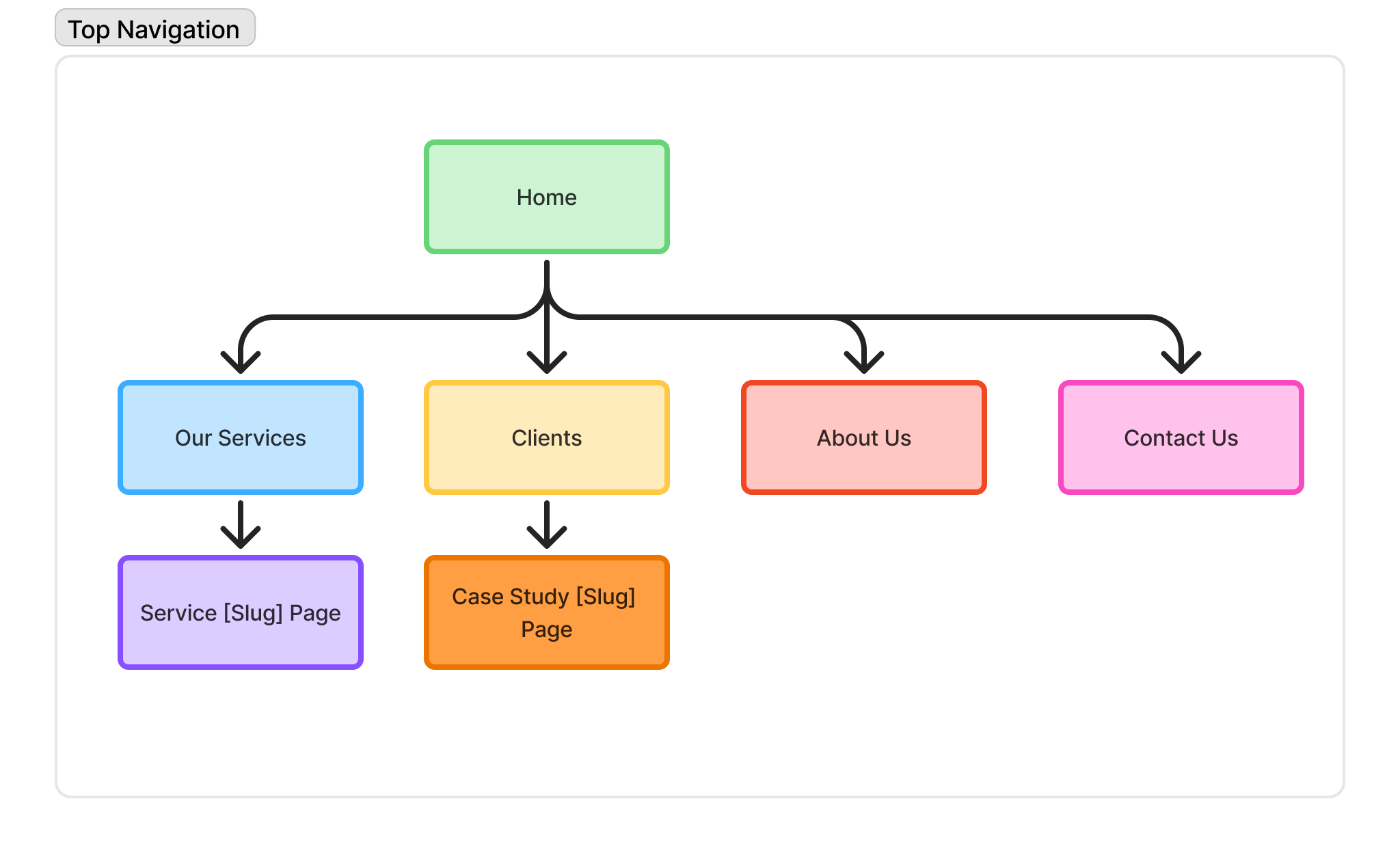
So, for example, a simple wireframe on paper or in Figma is enough for you to have your ideas represented.
(e.g. Flow diagram for a website.)
Organise the content.
Decide what text, images, and information each section needs.
Once we have a structure made and chosen, alongside the domain, we can start working on the visual aspects of the website. The two primary visuals are the fonts and colours you use.
We like to keep things clean and simple. We choose two fonts and three colours:
-One font for headings and one for the body text.
-A background colour, and a call-to-action colour.
When you limit the website to your branding colours, you are much less likely to end up with a disorganised website. It will be a lot easier for your website visitors to read the info and notice what’s important.
Colours affect trust, readability, and user focus. If you choose randomly, the site will feel inconsistent and less professional.
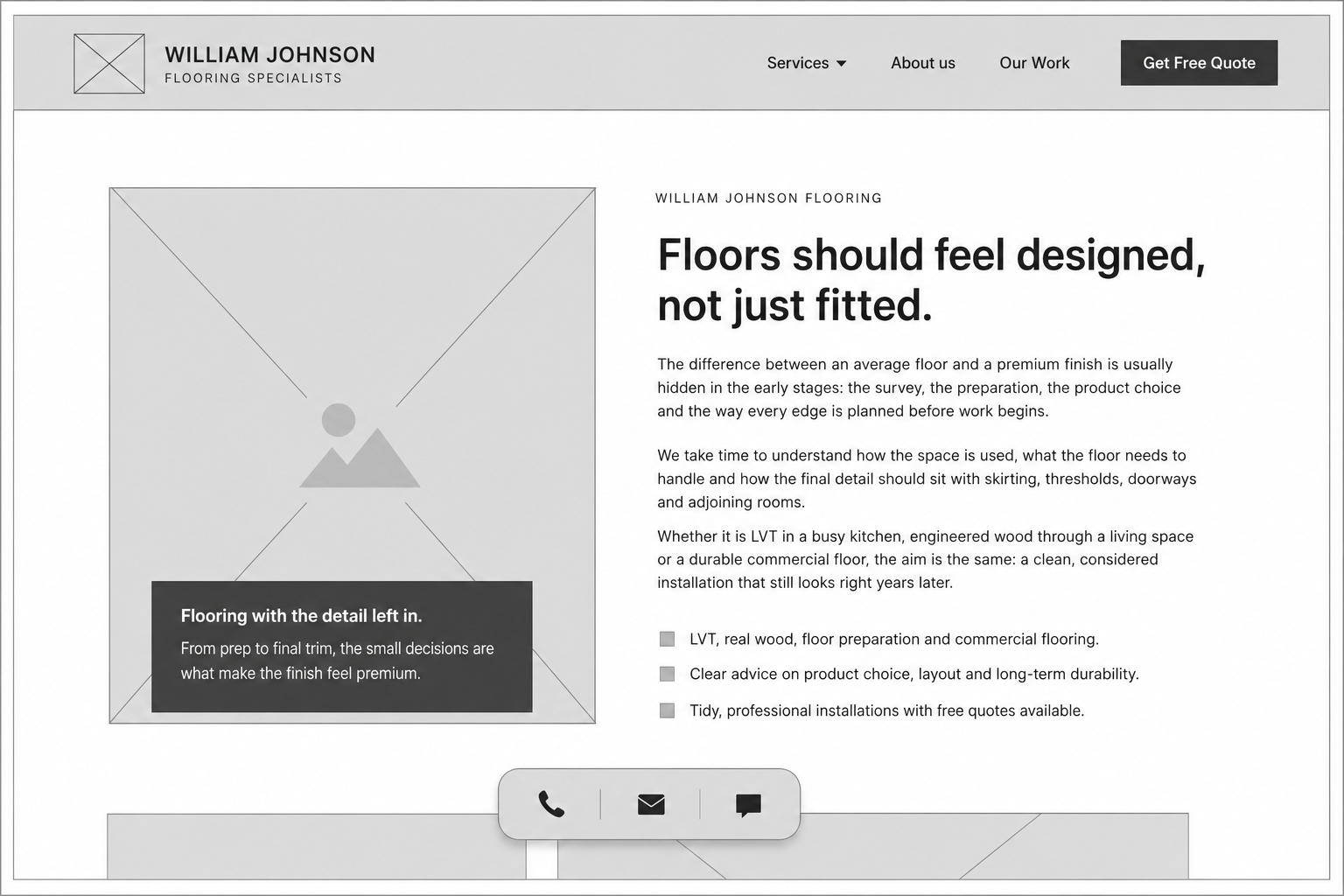
((e.g. )
(Picture 1 - Wireframe of a website.)
(Picture 2 - Final website design concept.))
Content writing
A website needs strong copy, not just a good design.
You should add:
- Clear headlines
- Service descriptions
- About section
- FAQs
- Calls to action
- Contact information
- Trust-building points such as reviews, experience, guarantees or accreditations.
Typography
1 font for headings
1 font for body text
Advice:
Keep it clean and readable, and avoid using many font styles.
Why it matters: typography controls readability and hierarchy. It guides the user’s attention and the order in which they read things first.
Visual style ( Imagery + UI Feel)
Type of images.
Style of icons.
Overall feel (aesthetic).
4. Choose the right platform.
Before finishing the last steps and starting to build the website, you need to decide how it will be created.
You could use a DIY website builder, a platform like WordPress or Shopify, or work with a website provider who handles design, build, and technical setup for you.
For many small businesses, working with a provider is the better option because it saves time and ensures the website is built properly from the start.
At OneTime Websites, we build professional websites for UK small businesses that are designed to work well on mobile, get found on Google, and turn visitors into enquiries.
We also offer services such as website development, e-commerce websites, SEO, local SEO, and AI search optimisation, depending on what your business needs.
A programmer or website provider gives you a faster, cleaner, more professional website built properly from the start.
Once we have all this, we can start the fun part: building the website, developing the pages, and ensuring that they work well on mobile devices. This is where your programmer, whether it is a platform or your UX / UI designer, needs to make sure everything works properly.
5. Add basic SEO.
This helps Google understand your site.
We have to make sure:
- Each page has a clear title.
- Each page has a meta description.
- Use proper headings.
- Include keywords naturally in your text.
- Make sure each page has a purpose.
This content should be written for people first, but structured in a way that search engines can understand.
Good SEO starts with clear pages, useful content, and a well-organised website.
6. Check website speed.
A slow website loses visitors quickly.
To improve website speed, you should:
- Compress images or videos.
- Avoid unnecessary plug-ins.
- Use a clean design.
- Choose a good hosting.
- Keep pages simple and lightweight.
Website speed affects user experience, trust, and performance.
If a site takes too long to load, many visitors will leave before they even see what you offer.
And finally..
7. Test and launch.
Before launching, the website needs to be tested.
Check that:
- All links work
- Forms submit correctly
- Buttons lead to the right places
- The website looks good on mobile
- Pages load properly
- Text is easy to read
- Contact details are correct
- There are no obvious spelling mistakes
Once everything is checked and working, the website can go live.
After launch, websites still need maintenance. You should keep the site updated, check forms, fix issues, and consider ongoing costs such as the domain, hosting, security, backups, and heavier websites that may need stronger hosting or extra support to run smoothly.
To conclude, building a website is not just about putting pages online.
It is about understanding the goal, planning the structure, creating a clear visual identity, building a smooth user experience and making sure people can find and use the website easily.
A good website should look professional, load quickly, guide visitors clearly, and help them take action.
Lastly, hopefully this guide gives you a clearer idea of what goes into building a professional website.
Thanks for reading.